How-To: Power BI Sentence Tooltips with Deneb

Sentence templates for tooltips were introduced to Power BI in June 2026. These allow you to add free text to the standard tooltip, using brace-enclosed tokens to denote where field values should be inserted, e.g.:
Total {Product} sales = {$ Sales}
Because Deneb delegates tooltip display back to Power BI, sentence templates work with Deneb visuals as well, but some setup is required to ensure the fields you want to reference are available. This post walks through the mechanics, the main gotcha, and some tricks for surfacing information from your specification in your sentences.
A Quick Recap on Deneb Tooltips
Deneb contains a tooltip handler written specifically for Power BI. Rather than rendering the Vega or Vega-Lite tooltip itself, it hands the mark's tooltip data back to Power BI, which then displays it using the Power BI APIs, and supports default tooltips and report page tooltips.
Sentence templates in the default tooltips haven't required any changes from our back end and work within the existing Power BI default tooltip framework, which is really quite neat. This means that if you've been wanting to work with this functionality in Deneb, you can get started any time you like, and this blog post may help you to understand how to get the most out of it.
The Tooltips menu is a standard container property, so it belongs to Power BI rather than Deneb. This means Deneb can't manipulate anything on that side of the fence: the sentence can't be read, set, or changed from within your specification, and it won't travel with a Deneb template - it needs to be configured on the visual itself, and everything downstream of the tooltip payload is handled by Power BI's tooltip APIs.
The key thing to understand for sentence templates is this: Power BI can only substitute fields that Deneb passes over in the tooltip datum. Any field you reference in your sentence template needs to be an explicit component of the tooltip that Deneb resolves for the hovered mark.
A Simple Example
Consider the following (abridged) Vega-Lite specification - a bar chart of Product against a $ Sales measure:
{
  ...
  "mark": {
    "type": "bar",
    "tooltip": true
  },
  "encoding": {
    "y": { "field": "Product", "type": "nominal" },
    "x": { "field": "$ Sales", "type": "quantitative" }
  }
}
And this sentence template, configured in the Tooltips settings in the properties pane:
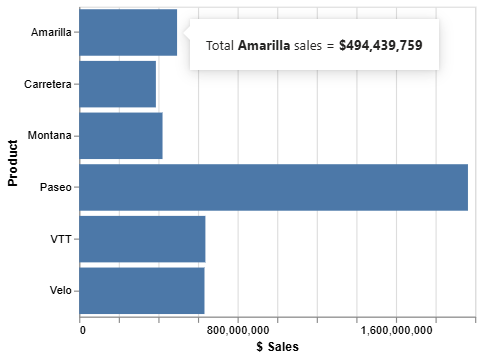
Total {Product} sales = {$ Sales}
Because both fields are used in encoding channels for the mark, Vega-Lite automatically folds them into the generated tooltip channel when we set "tooltip": true, so this works as expected:
The Gotcha: Fields Outside the Tooltip datum
Now, let's say we have a [$ Profit] measure in our dataset, but it isn't mapped to any encoding channel. We modify our sentence to:
Total {Product} sales = {$ Sales}; profit = {$ Profit}
This will not work as we might expect:

Because [$ Profit] isn't part of the tooltip data that Deneb passes back to Power BI, the placeholder is left as-is in the rendered sentence. There's no error or warning; the substitution just doesn't happen.
The Fix: An Explicit Tooltip Encoding
To remedy this, we need to ensure [$ Profit] is included in the tooltip data bound to the displayed mark.
Admittedly, we would probably extend our design to convey profit vs. sales more visually, but that puts [$ Profit] on a different mark, and the sentence resolves against whichever mark is hovered, so the tooltip for our sales bars would still have the same gap. For simplicity, we'll keep the design as-is. The cleanest fix is an explicit tooltip encoding channel that enumerates everything we need:
{
  ...
  "mark": {
    "type": "bar",
    "tooltip": true
  },
  "encoding": {
    ...
    "tooltip": [
      { "field": "Product" },
      { "field": "$ Sales" },
      { "field": "$ Profit" }
    ]
  }
}
All field values are now picked up and substituted correctly:

Note that:
- The values also pick up the format strings from the data model, as per Deneb's usual tooltip formatting resolution - [$ Profit] displays with its model formatting without any extra work on our part.
- If you're using multiple marks or layers, consider where the
tooltipchannel lives:- Defined at the top level - all layers inherit it, so your sentence resolves consistently whichever mark is hovered (this also addresses the multi-mark scenario above);
- Scoped to a single layer - only that layer's marks carry the fields.
What About Vega?
For Vega, the equivalent is the tooltip property in your mark's encode block. The curated counterpart to the explicit encoding above is to construct an object, e.g.:
{
  ...
  "encode": {
    "enter": {
      "tooltip": {
        "signal": "{'Product': datum['Product'], '$ Sales': datum['$ Sales'], '$ Profit': datum['$ Profit']}"
      }
    }
  },
  ...
}
The keys of this object are the names your sentence template placeholders need to match.
The Shotgun Alternative
Rather than enumerating fields, both languages also offer a "send everything" option. In Vega, this is the common pattern of passing the whole datum as the tooltip signal:
"tooltip": { "signal": "datum" }
...and in Vega-Lite, the equivalent mark property:
"mark": {
  "type": "bar",
  "tooltip": { "content": "data" }
}
Both of these make everything in the datum available to your sentence template (dataset fields, transform output, and Deneb's support fields alike) without enumeration, so any placeholder that names a datum field will resolve.
This certainly 'solves' the problem, but there's a trade-off: the tooltip Deneb hands back to Power BI now contains every field in the datum, so the standard tooltip content potentially becomes very busy, or includes fields you don't intend to display. In practice, the shotgun approach only really makes sense when you enable the Sentence format only flag in the tooltip settings, so that your sentence is all readers see. If the standard field list is still on display, the approaches above will work better.
Going Further: Surfacing Calculated Fields
Here's where it gets interesting. Because the rule is simply "anything in the tooltip datum is available to the template", this isn't limited to columns and measures from your dataset. Fields that only exist inside your specification can be surfaced into Power BI's sentence templates, too, for example:
- Transform output - fields you derive with
calculate/formula,joinaggregate,window, or other transforms. - Deneb's support fields - the additional fields Deneb appends to each datum for reconciliation purposes, such as
__row__and__selected__, plus highlight support fields like[measure]__highlightwhen cross-highlighting is enabled.
For example, in Vega-Lite, we could compute a profit margin inside the specification and include it in the tooltip channel:
{
  "transform": [
    {
      "calculate": "datum['$ Profit'] / datum['$ Sales']",
      "as": "Margin"
    }
  ],
  "mark": {
    "type": "bar",
    "tooltip": true
  },
  "encoding": {
    ...
    "tooltip": [
      { "field": "Product" },
      {
        "field": "$ Sales",
        "format": "#0.0",
        "formatType": "pbiFormatAutoUnit"
      },
      { "field": "Margin", "format": ".1%" }
    ]
  }
}
With a sentence template of:
{Product}: {$ Sales} sales at {Margin} margin
...the {Margin} placeholder resolves even though no such column exists in the data model. As far as Power BI is concerned, it's just another field in the tooltip payload:

You may have also spotted that we've re-formatted [$ Sales] while we're at it, using Deneb's pbiFormatAutoUnit custom format type with a Power BI format string. This mimics Power BI's Auto display unit behavior, so the large currency value renders in sentence-friendly units (0.49bn) rather than its full model formatting (which is often a better fit for prose than a long string of digits). Note that formats specified in the tooltip field definitions, including custom format types, carry all the way through to the rendered sentence.
What About Row Context?
You might be wondering whether row context - normally a crucial component of Deneb interactivity - constrains what you can do here. Fortunately, it doesn't. The default tooltip, where your sentence renders, is built from a plain object of key/value pairs that Deneb feeds to Power BI's tooltip API, with no row context required. The sentence logic simply tokenizes whatever data it's given, so it will happily resolve placeholders against a datum that is entirely synthetic - for example, the output of an aggregate transform that no longer maps to any row of your original dataset.
Row context only comes into play if you want a report page tooltip to resolve for the hovered mark - that does require the datum to reconcile back to an original dataset row, so transforms that collapse or mutate rows away will cost you that, but not your sentence.
If your placeholders aren't resolving, the quickest way to see what's actually in the tooltip payload is to temporarily switch to the shotgun approach above. This shows you every available field name, exactly as Power BI will receive them (including Deneb's support fields). The 'Debugging' with tooltips section of the documentation covers this in more detail.
Remember that placeholder names must match the tooltip field names exactly, including any symbols, spaces, or other characters in your column and measure names. Also, if a field name is encoded due to Vega limitations, this needs to be written in the sentence placeholder as its escaped value rather than its input name to resolve correctly.
Wrapping Up
Sentence templates are a nice, low-effort way to add narrative to Deneb visuals without building custom text marks, and they compose well with everything Deneb already does for tooltip delegation. The rules to remember:
- Every field referenced in a sentence template must be present in the mark's tooltip datum:
- Use an explicit
tooltipencoding (Vega-Lite) ortooltipencode entry (Vega) to guarantee this. - The shotgun approach (
{"content": "data"}/{"signal": "datum"}) also works, but pair it with Sentence format only so you don't overfill the standard tooltip.
- Use an explicit
- Specification-only fields (transforms, support fields) work too, but you're responsible for their formatting.
- Row context doesn't constrain your sentences. The default tooltip tokenizes any data you send it, even fully synthetic datums. It only matters if you also want report page tooltips to resolve.
- The sentence itself is Power BI's, not Deneb's - it's a standard container property, so it can't be driven from the specification and won't travel with a Deneb template. Only the tooltip payload can be shaped.
If you find any use cases where this doesn't behave as expected, please create an issue with reproduction steps, and we'll see what we can do about improving it (if we can).
Thanks, as always, for reading, and I hope that Deneb continues to help you achieve your visual goals!
DM-P