Deneb 2.0 Available for Beta Testing

Strategically, I've been working on Deneb 2.0 for a long time now; almost the last two years in some form or another (including starting over twice 😅). I've wanted to solve a lot of long-awaited requests and add new functionality that I think is valuable for development and the user experience, while ensuring we can move the existing visual over to a new version with no friction for existing users.
It's been a long road, but finally, we can start beta testing!
As usual, once we submit to AppSource, it gets really difficult to make changes at pace without affecting all of our users globally, so this is a critical time to get as much testing and validation as possible before we submit. And we can't do that without your help.
The Importance of Beta Testing
I think it's important to re-emphasize this point for newcomers, and for anyone who uses Deneb in any capacity and wants to ensure their work continues to operate as expected when we move to a new release.
Deneb's Reach is Comprehensive
In the last 4 months alone (Apr - Jul 2026), we had ~90K developers across ~41K organizations download and use Deneb in their reports. I can't speak for how other visuals do in terms of their user base, but this is way more than I ever envisaged (and that's not a bad thing). However, one crucial thing to consider is...
Deneb Is Free and Open-Source
Deneb is a free and open-source project, built for the community, by the community. It's not commercially licensed or supported, so resources are tight and entirely driven by our passion for the power of the Vega languages and bringing them to Power BI. Our team is:
- 1 developer
- 9 community experts, providing voluntary support
Not to mention:
- Countless folks who share their own examples and help others learn and grow.
- Wonderful sponsors who help keep tooling and hosting costs down, and provide me with the ability to occasionally take a break from billable work to focus on features or issues that need more dedication to deliver.
We're incredibly grateful for the engagement and support from the community, and Deneb is nearly reaching its 5-year anniversary of being available and certified in AppSource. We're looking forward to many more!
1.9 > 2.0: It's a Big Bump
We did a lot of preparation for this moment in 1.9, but the magic happens in this version.
- To support new features and modernize the codebase, there are active migrations that happen to your existing visuals as soon as 2.0 hits your report.
- Visuals get deployed gradually across the globe after certification approval, so we can't reliably predict when you'll get them (just a window of 1-2 weeks).
- The more developers who can confirm their experience is seamless (or let us know of the problems they encounter), the more confident we'll be when we submit.
The Elephant in the (Global) Room
- Once we submit to AppSource, we're locked into a 3-5 week certification cycle.
- If a bug slips through that affects your reports, that's potentially 3-5 weeks before a fix reaches you and your readers.
- This is why your involvement in beta testing (if you can spare it) is not just helpful, it's essential for the entire Deneb community.
We Only See A Small Portion of Real World Usage
There is so much more widespread usage of Deneb across different industries, data shapes, and use cases that we just don't get to see, given the often commercially sensitive nature of our data models and reports. It's you that I'm really hoping to reach.
Your Help Can Have A Huge Impact
It cannot be overstated how valuable your contributions can be. Just checking a visual and reporting anything that doesn't look right goes a huge way towards our confidence that those who depend on Deneb in their work aren't affected. If something's off, it's highly likely you won't be the only one affected. Quietly working around it is my default instinct too, but it shouldn't be - I'd rather get notified about the same problem 50 times than never know.
You're not just helping me fix bugs; you're ensuring that:
- Developers can continue to rely on Deneb for their visualization needs
- End users don't experience disruptions in their reports
- The community maintains confidence in Deneb's stability and quality
- We can continue to build on this platform with new features in future releases
The reality of being a free, community-supported project means we don't have the resources of a commercial product team. We rely on people like you to help ensure quality. This is what makes our community special, and why I'm continually grateful for the support and engagement from everyone involved 🫶.
What's In This Release
It's a big one. I won't go into all the details here, but you can check out the Change Log for full details. Some of the highlights include:
- Field parameter support - consolidation into array-valued columns, with companion fields and template awareness.
- Supporting fields configuration - per-field control over which supporting fields Deneb adds to your dataset.
- Continuous view - eligible datasets are patched in-place on filter/slicer changes, preserving view, input, and selection state.
- A rewritten parsing and rendering pipeline - the architectural overhaul that makes much of the above possible.
- View and convert compiled Vega - see the Vega generated from your Vega-Lite spec, and adopt it as a starting point.
- Canvas renderer: scale to report zoom - much crisper canvas rendering at higher zoom levels.
- Better context menu control - suppress the Power BI context menu and/or data point resolution, e.g., for your own right-click handlers.
- Debug pane improvements - separate Source vs. (Vega) Data tabs, and click-to-inspect for any cell value.
- Keyboard and accessibility improvements - tab into the visual from the report canvas, and navigate debug tables as a grid.
What We Need From You
1. Validate Your Existing Specifications
This is the most critical testing you can do:
- Open reports containing Deneb visuals and update them to the beta version.
- Verify that everything works exactly as it did before: no visual differences, no broken functionality, no performance regressions.
- Test both as a viewer (consumption) and as a developer (editing).
- Pay particular attention to visuals using interactivity features (cross-filtering, cross-highlighting, tooltips, etc.).
- Confirm the workflow for creating a new visual from scratch also works as expected, and the generation of a template (if this is part of your process).
Even if you just update one visual and confirm it works, that's valuable confirmation of stability across different use cases.
2. Test Edge Cases and Complex Scenarios
If you have specifications that:
- Use advanced interactivity features
- Have complex data transformations
- Include dynamic signals and parameters
- Rely on Power BI formatting functions
- Use the debug pane extensively
...these are exactly the scenarios we need tested, as they're most likely to surface issues from the refactoring work.
3. Explore New Features
Enjoy the new stuff! It's important that you're getting the benefits you're asking for, can play with them before they land officially, and that everything works as the docs say it does. But also, that things work as you expect them to.
If there's anything here that grates or creates friction, then it's good to know. Non-critical issues might not be fixed before submission, but we'll always try to bring in any potential improvements as soon as we can. And anything that makes your experience better is something we want to help with, if we can.
4. Provide Detailed Feedback if Something's Wrong
When something doesn't work as expected, detailed information is essential for rapid diagnosis and fixes. The following makes an enormous difference:
- Version/build number (instructions here)
- Steps to reproduce the issue
- Expected vs. actual behavior and ideally how this differs from previous versions (which will help to further triage problems)
- Screenshots or short videos showing the problem
- Specification and/or sample workbook (with public/anonymized data)
The more detail you can provide, the faster we can identify and resolve issues. As I'm doing everything development-wise, as much detail as possible will help me reproduce and find the problem, which means more time to fix it and turn around updates. Please don't assume someone else has already reported it. If you see it, please create an issue or add to an existing one.
How to Access the Beta
The latest beta build is available now from the Beta Channel page on GitHub, e.g.:
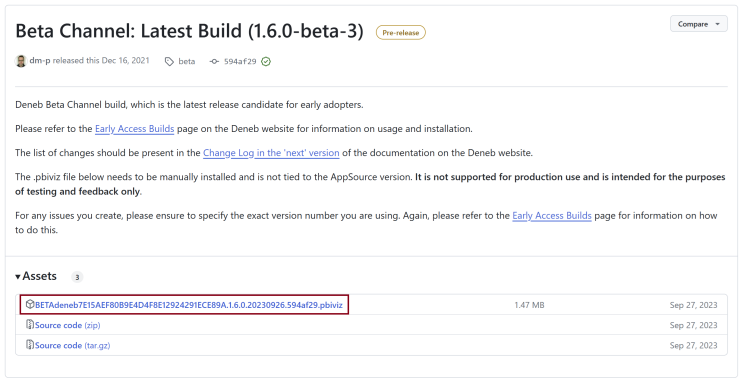
- Download the .pbiviz file from the Assets section
- Manually import it into your report
- The beta version installs alongside the AppSource version with a distinct icon
For complete details on the beta process, feedback mechanisms, and version identification, see the Early Access page.
Test with copies of production reports, not the originals. This way you can easily revert if needed without losing any work.
Planned Timeline
The overarching decision for this is not sending an update for submission before it's ready - the #1 priority is that nothing breaks for developers and readers, which I may have mentioned a few times already 😅 - the current plan is:
- Beta testing period: Starting now, aiming for 3-4 weeks of community validation
- Submission to AppSource: End of August/start of September 2026 (assuming no blocking issues)
- General availability: Depending on Microsoft's certification timeline, likely late September to early October
Major blockers will delay this timeline, but I'll try to communicate any major deviations/disruptions if they occur.
Once Again, Thank You
Hopefully you aren't tired by now of hearing me thank you for reading, and for maybe considering whether to help test and validate. I genuinely mean it. If you can spare some of your valuable time, it will have a big impact on our community at large.
I'm really looking forward to bringing 2.0 to your reports as soon as I can, and I hope you'll enjoy finding ways to make your reports better with the new features!
All the best,
DM-P